Boss’nX: KNX, BACnet and Modbus building supervision
Boss’nX is the Can’nX cloud supervision for KNX and IoT installations. A supervision presents a building: its topology, its components and their KNX, BACnet or Modbus datapoints, its alarms and its dashboards. A hypervision groups several supervisions, within the scope authorized for the account. The guides cover daily use, preparing the supervision as an installer and administering accounts.
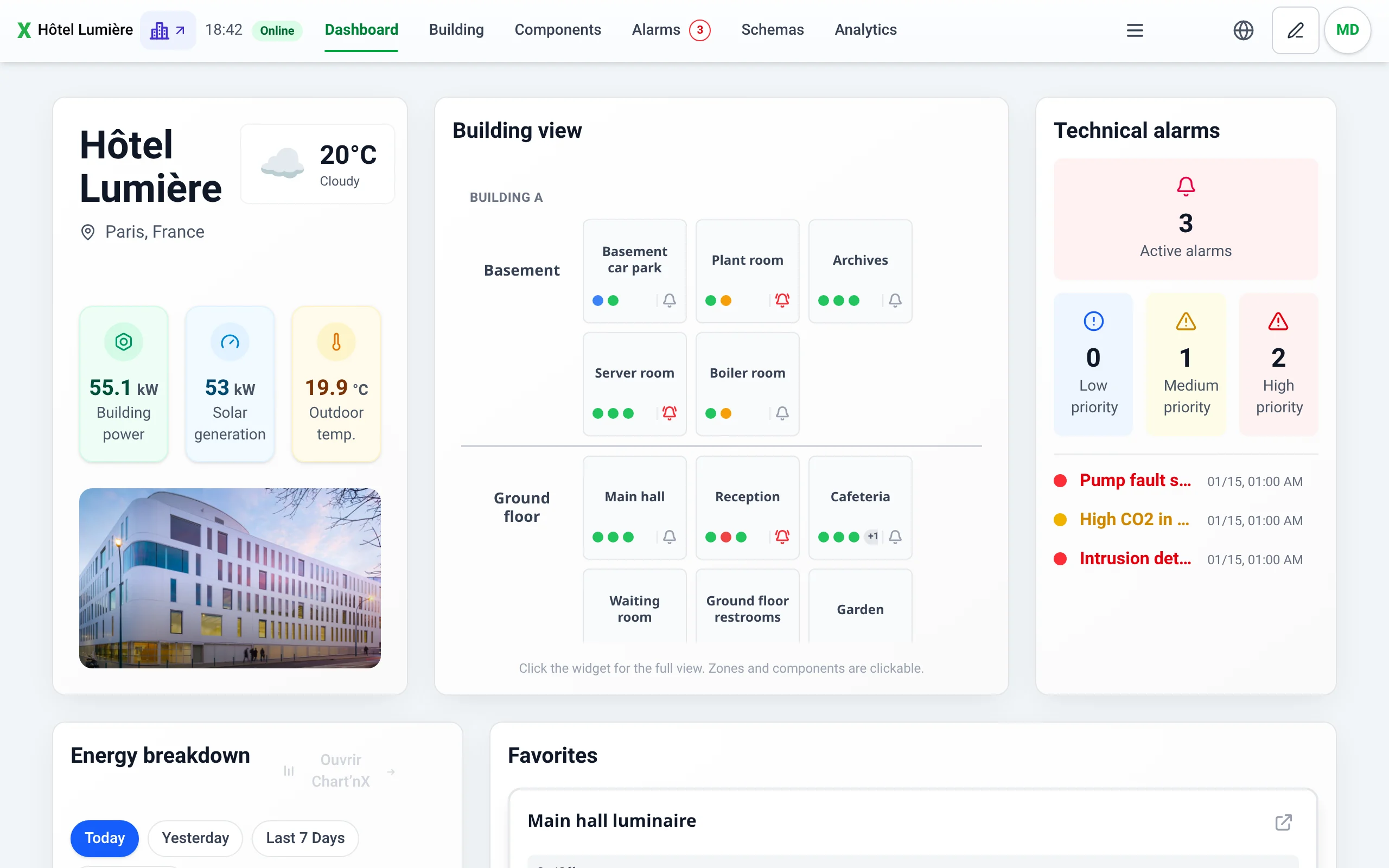
Getting started
Section titled “Getting started”- Sign in with the link provided for your building or your hypervision: this link determines the context that opens.
- Find your way: your page bar offers Dashboard, Building, Components, Alarms, Schemas and Analytics by default, and the Menu button opens every page your permissions allow, with a search.
- If a Hypervision chip appears in the header, switch to the hypervision.
Main tasks
Section titled “Main tasks”| Topic | Key guides |
|---|---|
| View and control | Find a floor or a zone, open a component, set a value, choose a state or a pulse |
| Prepare from the KNX project | Import the .knxproj file, create components from the KNX structure, organize building parts, floors and zones |
| Configure components and datapoints | Create a component, KNX, BACnet and Modbus datapoints, link a Link’nX action, choose the KNX addresses to log |
| BACnet and Modbus devices | Declare a BACnet device, discover its objects, add a Modbus gateway |
| Alarms | Understand an alarm, acknowledge it, configure a threshold alarm, create alarms by tag, notify a role |
| Dashboards and analyses | Organize the dashboard, browse schemas, generate a chart, read the energy breakdown, open Chart’nX |
| Time programming | Run a scenario, create a schedule |
| Accounts and guest access | Create a role, create an account, create a QR access |
| Hypervision | Open a supervision from the map, go to the alarm history, read consumption |
| Network health | Read the monitor states, view the KNX gateways |
The role’s permissions determine which pages are offered. Preparation requires in particular Manage topology for the KNX import and the organization, Manage components for components and their datapoints, Manage BACnet and Manage Modbus for the corresponding devices. The KNX project import is done on a computer.
Troubleshooting
Section titled “Troubleshooting”- Access, menus and session, accounts and login sharing.
- Command without the expected result, zone difficult to view.
- KNX project or dictionary import, BACnet datapoint, Modbus datapoint and reading test.
- Component alarm and heartbeat, refused guest QR code.
See also KNX and ETS, BACnet, Modbus, Supervision and visualization and the Kloud’nX gateways.
All Boss’nX guides
Section titled “All Boss’nX guides”Access and getting started
Section titled “Access and getting started”- Sign in to Boss’nX: supervision, hypervision and sign-out
- Navigate in Boss’nX: page bar, Menu, search and language
- Boss’nX session expired: stay signed in or reconnect
Accounts, permissions and guest access
Section titled “Accounts, permissions and guest access”- Boss’nX owner alarm emails: address, delivery and rules
- Change your Boss’nX password in a supervision or hypervision
- Archive, restore or permanently delete a Boss’nX QR code
- Configure a Boss’nX guest QR code: components, location and session
- Create a guest access QR code and choose its components in Boss’nX
- Scan a room’s QR code to open a Boss’nX guest access
- Use the Boss’nX guest space: zones, commands and expired session
- Read the state of guest access QR codes and rename them in Boss’nX
- View, download and print guest access QR codes in Boss’nX
- Boss’nX role capabilities: action rights and logs scope
- Create or rename a user role in Boss’nX
- Hide datapoints or make them read-only by tag in Boss’nX
- Configure a Boss’nX role’s alarm emails by tag and severity
- Limit a Boss’nX role rule to specific floors or zones
- Boss’nX role: allow or deny a floor, a zone or a component
- Boss’nX role scope: define the accessible components
- Boss’nX role: limit visible datapoints with “Show only”
- Boss’nX role: choose the widgets allowed on the dashboard
- Boss’nX roles: view permissions, scope and assigned accounts
- Delete a Boss’nX role and reassign its accounts to another role
- Share access to Boss’nX: login link and QR code
- Alarm emails for a Boss’nX account: address, muting and troubleshooting
- View user accounts and their roles in Boss’nX
- Create a user account in Boss’nX and assign its role
- Delete a Boss’nX user account in a supervision or hypervision
- Change the role or password of a Boss’nX user account
Alarms and notifications
Section titled “Alarms and notifications”- Acknowledge an alarm in Boss’nX, in a supervision or hypervision
- Boss’nX alarm history: search, filter and read an alarm
- Delete entries from the alarm history in Boss’nX
- Export Boss’nX alarms to CSV: file, columns and UTC dates
- Put a datapoint in standby in Boss’nX and reactivate its notifications
- Threshold or value alarm on a KNX or BACnet datapoint in Boss’nX
- Compare two KNX measurements in a Boss’nX component alarm
- Boss’nX alarm rules: compare two KNX measurements in bulk
- Boss’nX alarm rules: create KNX alarms in bulk by tag
- Boss’nX alarm rules: threshold, boolean or list of values
- Boss’nX alarm rules: find and delete alarm datapoints
Building, components and datapoints
Section titled “Building, components and datapoints”- Boss’nX Auto-tag: assign tags to datapoints automatically
- Find a floor or zone in the Boss’nX building topology
- Filter the Boss’nX building topology by name, floor or type
- Open a component in Boss’nX and read its datapoint values
- Duplicate a component or a datapoint and organize datapoints in Boss’nX
- Delete a component and its datapoints from its detail in Boss’nX
- Create or edit a component and its datapoints in Boss’nX
- View a component’s history and its KNX entries in Boss’nX
- Reorder a component’s datapoints by drag and drop in Boss’nX
- Delete one or more components from the Boss’nX list
- Search for a component by name, zone or KNX address in Boss’nX
- Create and organize building parts, floors and zones in Boss’nX
- KNX datapoint in Boss’nX: display, controls and pulses
- Change the Boss’nX site title, location and map position
- Assign, replace or remove the tag of datapoints in Boss’nX
- Boss’nX tags: browse the catalog and the assigned datapoints
- Create, edit or delete a custom datapoint tag in Boss’nX
- View and filter a zone’s components in Boss’nX
- Choose the three displayed values on a Boss’nX zone card
- Command history of a zone or floor in Boss’nX
Configuration and use
Section titled “Configuration and use”- Chart historical measurements in Boss’nX analytics
- Export Boss’nX analytics measurements to CSV
- Create and reuse datapoint favorites in Boss’nX analytics
- Period, aggregation and chart reading in Boss’nX analytics
- Boss’nX legacy alert recipients: view and export to CSV
Dashboards and hypervision
Section titled “Dashboards and hypervision”- Boss’nX technical alarms: read the dashboard summary
- Boss’nX dashboard favorites: add or remove a component
- Arrange the widgets on a Boss’nX supervision dashboard
- Boss’nX dashboard external link: add, open or delete a link button
- Boss’nX dashboard schema: zoom, pan and switch layers
- Add a schema to the Boss’nX dashboard and choose its starting layer
- Boss’nX energy breakdown: read a supervision’s energy widget
- Add a Boss’nX energy widget and link it to a Chart’nX dashboard
- Track alarms across several sites in the Boss’nX hypervision
- Multi-site energy consumption in the Boss’nX hypervision
- Set up the Boss’nX hypervision energy widget with Chart’nX
- Aggregated favorites in the Boss’nX hypervision: view and control
- Move and resize the Boss’nX hypervision widgets
- Boss’nX hypervision map: find and open a supervision
- Switch from a supervision to a Boss’nX hypervision and back
- Boss’nX overview: read the site’s weather, image and statistics
- Boss’nX overview: configure statistics and KNX measurements
- Boss’nX overview image: add, change or delete the site photo
Protocols, imports and monitoring
Section titled “Protocols, imports and monitoring”- Declare a BACnet device in Boss’nX: IP address, port and instance
- Discover BACnet objects in Boss’nX and fix discovery errors
- View BACnet objects and their intrinsic alarming in Boss’nX
- Run a Link’nX scenario or action from a Boss’nX component
- Boss’nX network health: understand IP and KNX device status
- Add and manage an IP or KNX monitor in Boss’nX network health
- Scan a KNX line to monitor its participants in Boss’nX
- Import several BACnet objects as datapoints of a Boss’nX component
- Add KNX group addresses in bulk to a Boss’nX component
- Import Modbus monitoring configurations into a Boss’nX component
- KNX dictionary: recognize group addresses in Boss’nX
- KNX gateways in Boss’nX: status, bus voltage and bus load
- Select KNX group addresses for data logging in Boss’nX
- Import an ETS project (.knxproj file) into Boss’nX
- Reimport a KNX project in Boss’nX: merges and address conflicts
- Create components from the KNX project structure in Boss’nX
- Import selected floors and zones from the KNX project into Boss’nX
- Configure a Modbus register reading for history in Boss’nX
- Add or edit a shared Modbus TCP gateway in Boss’nX
- Duplicate, disable or delete a Modbus gateway in Boss’nX
- Configure a BACnet datapoint in Boss’nX: object, reading and command
- KNX datapoint in Boss’nX: group addresses, DPT and gateway
- Link a Boss’nX datapoint to a Link’nX scenario or action
- Configure a Boss’nX Modbus datapoint: read and write a register
Questions and troubleshooting
Section titled “Questions and troubleshooting”- Boss’nX access, menus and session: troubleshooting and FAQ
- Boss’nX command not working: troubleshooting and FAQ
- Boss’nX dashboard favorites and alarms: frequently asked questions
- Boss’nX dashboard schemas: troubleshooting and frequently asked questions
- Boss’nX energy breakdown: troubleshooting and frequently asked questions
- Boss’nX hypervision energy: troubleshooting and FAQ
- Boss’nX hypervision dashboard: troubleshooting and FAQ
- KNX monitoring in Boss’nX: troubleshoot selection and saving
- KNX .knxproj import and dictionary in Boss’nX: troubleshooting
- KNX structure in Boss’nX: troubleshooting component creation
- Test a Modbus register read and troubleshoot monitoring in Boss’nX
- Boss’nX building organization: save and recover after a failure
- Boss’nX overview and links: troubleshooting and common questions
- Boss’nX component alarms: heartbeat, BACnet source and troubleshooting
- BACnet datapoint in Boss’nX: troubleshooting and FAQ
- Boss’nX Modbus datapoint: test the reading and fix errors
- Boss’nX guest QR access: troubleshooting and frequently asked questions
- Icon button and linked datapoint in Boss’nX: frequently asked questions
- Boss’nX schema canvas: troubleshooting and frequently asked questions
- Boss’nX schema conflicts: troubleshooting and frequently asked questions
- Saving Boss’nX schemas: troubleshooting and frequently asked questions
- Boss’nX navigation link: troubleshooting and FAQ
- Boss’nX Datapoints palette: troubleshooting and FAQ
- Used datapoints in a Boss’nX schema: frequently asked questions
- Boss’nX schema errors and warnings: frequently asked questions
- Boss’nX Schemas page: troubleshooting and frequently asked questions
- Boss’nX user accounts: troubleshooting and frequently asked questions
- Boss’nX zone troubleshooting: components, datapoints and displayed values
Scenarios and commands
Section titled “Scenarios and commands”- Control a Boss’nX datapoint: two states, option list or pulse
- Adjust a setpoint in Boss’nX: + and − buttons, typed value or slider
- Boss’nX scenario actions: commands, values, delays and order
- Boss’nX Time Programming: find, enable and run a scenario
- Create, edit or delete a Boss’nX Time Programming scenario
- Boss’nX scenario triggers: fixed time, sunrise, sunset and conditions
Schemas
Section titled “Schemas”- Boss’nX schema background: choose a color, pattern or image
- Link an Icon button to a datapoint in a Boss’nX schema
- Boss’nX schema: set the canvas size, format and grid
- Zoom, pan and undo in the Boss’nX schema editor
- Resolve layer conflicts when saving a Boss’nX schema
- Create, name and save a schema in the Boss’nX editor
- Add, rename or delete a Boss’nX schema layer
- Boss’nX navigation link: open another layer or another schema
- Place datapoints and component cards in a Boss’nX schema
- Find where a datapoint is used in a Boss’nX schema
- Fix the errors and warnings of a Boss’nX schema
- Boss’nX Schemas page: open a plan, switch layers and zoom
- Duplicate or delete a Boss’nX schema from the Schemas page