Acknowledge an alarm in Boss’nX, in a supervision or hypervision
Boss’nXUserAdministratorInstaller
Boss’nX: Alarms page of a supervision or Aggregated alarms of the hypervision, Acknowledge alarms capability
Acknowledging an alarm in Boss’nX marks it as acknowledged: its Acknowledged column changes to Yes. The action is irreversible. It does not resolve the cause of the alarm and does not command the equipment to stop: the alarm may remain active.
For the user, administrator or installer authorized to acknowledge alarms. To suspend a datapoint’s notifications instead, use the standby procedure.
Before you start
Section titled “Before you start”- Your role has the Acknowledge alarms capability. The View alarms right alone does not show the button. The Delete alarm history capability is separate and is not needed for this procedure. See a role’s capabilities.
- You can identify the alarm: project if any, component, message and start time. See viewing alarms.
Acknowledge the alarm
Section titled “Acknowledge the alarm”-
Open Alarms in the supervision, or Aggregated alarms in hypervision.
-
Find the alarm by checking the project if any, the component, the message and the start time.
-
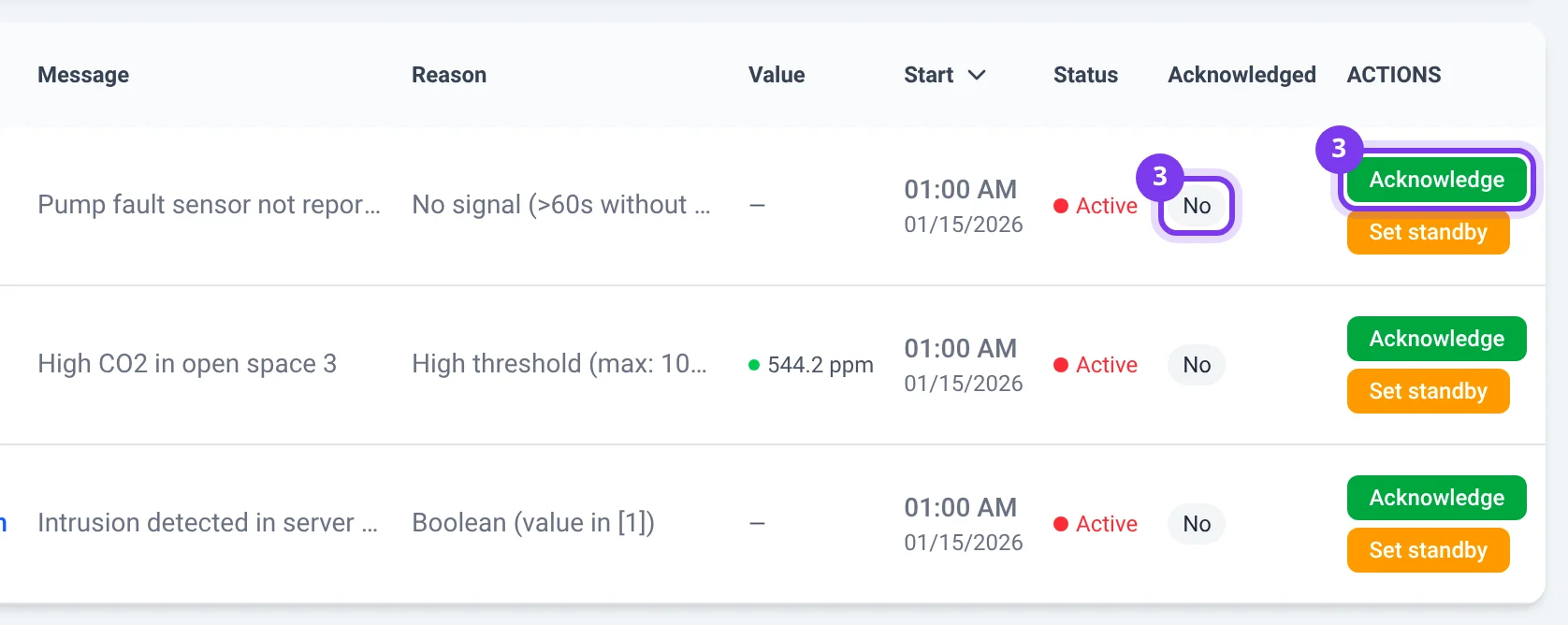
On its row, check that the Acknowledged column shows No, then click Acknowledge in the Actions column, on the right.
-
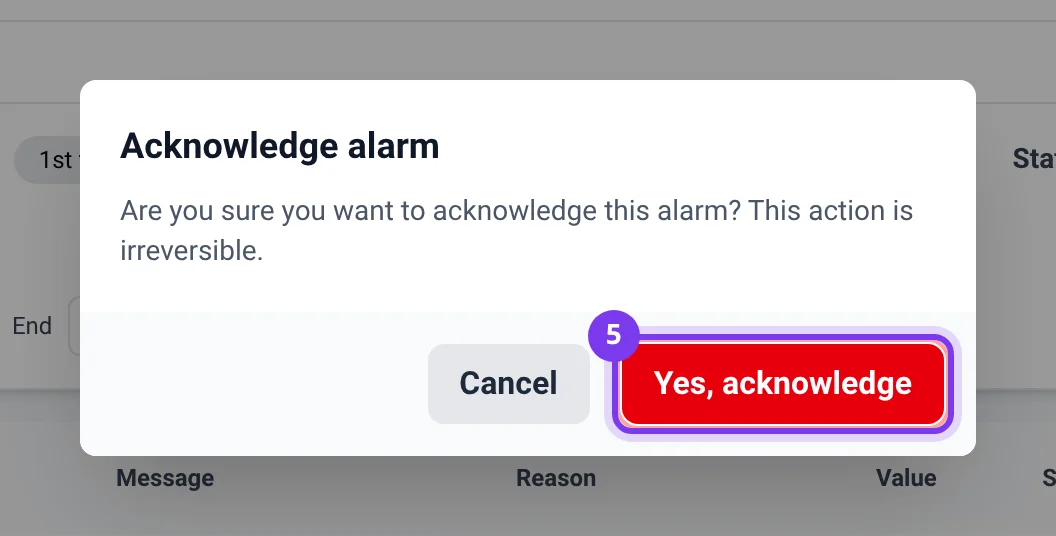
In the Acknowledge alarm window, read the warning: the action is irreversible.
-
Click Yes, acknowledge to send the request, or Cancel to keep the current state. Before confirmation, Escape or a click on the dimmed background also closes the window.
-
Wait for the window to close.
Once Yes, acknowledge has been used, closing a window does not cancel the request already sent. The procedure offers no undo after acknowledgment.
Check the result
Section titled “Check the result”- The row’s Acknowledged column shows Yes and the Acknowledge button has disappeared from this row. Only this value confirms the save, even when no error message appeared.
- The row may remain Active after acknowledgment.
- If the Acknowledgment filter was set to No, the row may leave the results: remove this filter or choose Yes to find it again.
To keep a record of acknowledged alarms, use the CSV export, which includes the Acknowledged column.
Troubleshooting
Section titled “Troubleshooting”- Acknowledge does not appear: if Acknowledged is already Yes, the row no longer offers it. Otherwise, have the Acknowledge alarms capability of your role checked.
- The window closes without any visible change: check the same row and the filters, then reopen the history before drawing a conclusion.
If the acknowledgment remains No, if the alarm can no longer be found without the filters explaining it or if a doubt persists, contact support@can-nx.com with the supervision, the component, the message, the time and the result observed.
French labels: Acquitter, Acquitter l’alarme, Oui, acquitter, Annuler and Acquittée.